Exploring Linux Fundamentals (June 11)

Linux architecture
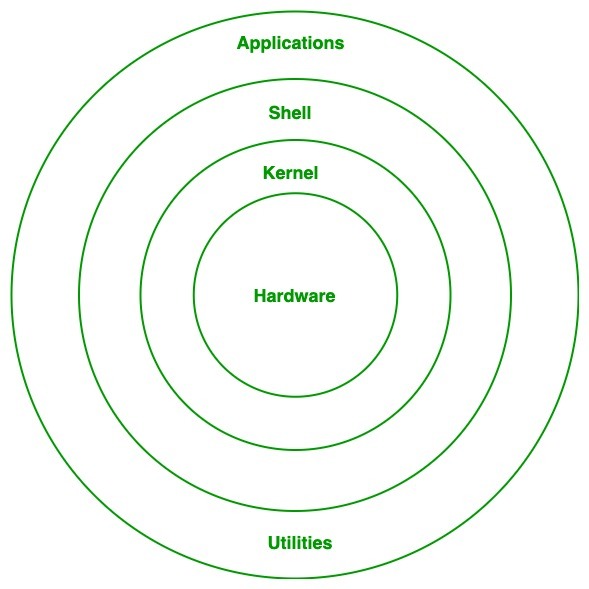
Kernel: Kernel is the core of the Linux-based operating system. It virtualizes the common hardware resources of the computer to provide each process with its virtual resources. This makes the process seem as if it is the sole process running on the machine. The kernel is also responsible for preventing and mitigating conflicts between different processes. Different types of the kernel are:
Monolithic Kernel
Hybrid kernels
Exo kernels
Micro kernels
System Library: Isthe special types of functions that are used to implement the functionality of the operating system.
Shell: It is an interface to the kernel which hides the complexity of the kernel’s functions from the users. It takes commands from the user and executes the kernel’s functions.
Hardware Layer: This layer consists all peripheral devices like RAM/ HDD/ CPU etc.
System Utility: It provides the functionalities of an operating system to the user.
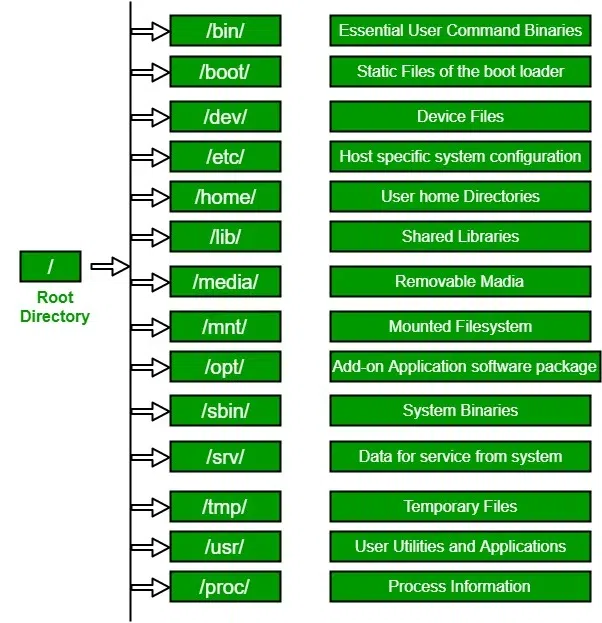
Linux File Hierarchy Structure

Linux Commands
hat every Linux user(as a beginner) should know. These are not all that you should know, but these are the basic and most commonly used commands.
Is – Displays information about files in the current directory.
pwd – Displays the current working directory.
mkdir – Creates a directory.
cd – To navigate between different folders.
rmdir – Removes empty directories from the directory lists.
cp – Moves files from one directory to another.
mv – Rename and Replace the files
rm – Delete files
uname – Command to get basic information about the OS
locate– Find a file in the database.
touch – Create empty files
ln – Create shortcuts to other files
cat – Display file contents on terminal
clear – Clear terminal
ps- Display the processes in terminal
man – Access manual for all Linux commands
grep- Search for a specific string in an output
echo- Display active processes on the terminal
wget – download files from the internet
whoami- Create or update passwords for existing users
sort- sort the file content
cal- View Calendar in terminal
whereis – View the exact location of any command types after this command
df – Check the details of the file system
wc – Check the lines, word count, and characters in a file using different options
Linux hands-on


you can mv a folder without using -r (when using the mv command to move a folder, it automatically performs a recursive move by default) but for copying a folder you have to use -r.


The same goes for the folder but when you remove a folder you have to "-r " which means recursive to remove files inside the folder

About the author
Hey there! I'm currently working as an Associate DevOps Engineer, and I'm diving into popular DevOps tools like Azure Devops,Linux, Docker, Kubernetes,Terraform and Ansible. I'm also on the learning track with AWS certifications to amp up my cloud game. If you're into tech collaborations and exploring new horizons, let's connect!
Comments
Join the discussionNo comments yet. Be the first to comment.



